


Description
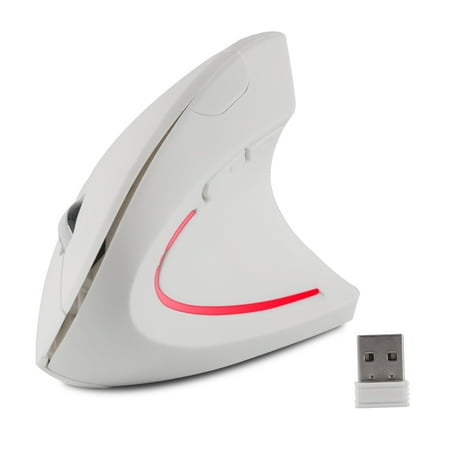
Wireless vertical ergonomic mouse giving you the best comfort. How to use it? 1. Take out the mini receiver (At the bottom of the mouse) Note: Please don t shake the mouse violently to avoid dropping the USB receiver. 2. Install 2 AAA batteries with correct polarity (+/-) (Powered by 2 * AAA batteries (not included)) 3. Insert the receiver into the computer USB interface and wait a few seconds it installs automatically. You can enjoy wireless freedom rapidly. Ergonomic Design Reduce Wrist Pain This ergonomic mouse is full of vitality and innovation and has many health benefits. By changing the way you use your wrist and arms you will effectively reduce pain and discomfort. 3 Adjustable DPI This mouse has 800-1200-1600DPI so you can easily change the cursor speed and adjusts the sensitivity of the mouse. Add 2 Buttons on the Side Forward/Back buttons help you browse the web faster to increase your productivity (Note: Not available in MAC OS systems) 2.4G Wireless Transmission This Wireless mouse for a laptop with 2.4GHz wireless technology and a professional chip ensures a longer working distance reaching up to 33ft Product Specifications: DPI: 800-1200-1600 Power Supply: 2 x AAA batteries (not included) Sleep Mode: 10 minutes Wake-up Method: Move the mouse or click the button once Button: 5 buttons in default / 1 scroll wheel (middle button) Product Dimension: 4.92 x 3.23 x 2.56 / 12.5cm x 8.2cm x 6.5cm Wide Compatibility: Device Compatibility: PC Laptop Computer Macbook Desktop System Compatibility: Windows 10 Windows Vista Linux Mac OS X Windows XP Package List: 1 * Wireless Vertical Mouse 1 * USB Receiver ( in the bottom of the mouse ) 1 * User Manual Warm Tips: Due to the innovative design of this ergonomic mouse you may initially find it difficult to use. Please continue use over several days to grow accustomed to and enjoy the full comfort of the design



Reviews
There are no reviews yet.